Track your Apple Ads revenue
Track which campaigns and keywords bring customers so you can grow your app business, fast.
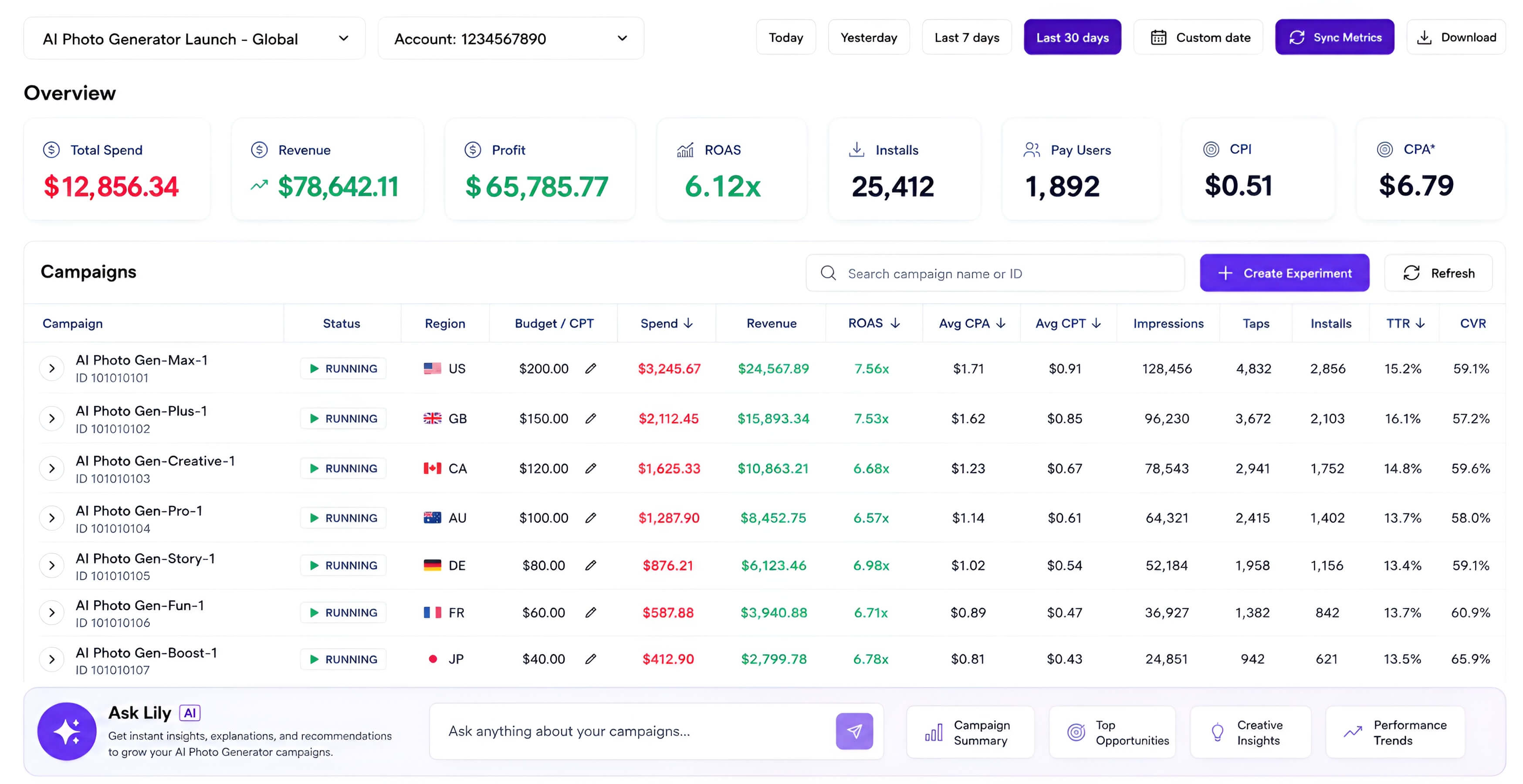
Stop paying for Apple Ads keywords that bring $0 revenue.
Apple Ads shows spend, not customer revenue
Campaigns, countries, and keywords look busy until you match them to subscriptions and purchases.
RevenueCat or AppsFlyer has revenue, but not your ad decision layer
You still need to join spend and transaction data before you know what to scale, pause, or watch.
Manual CSV analysis does not compound
Exporting files into a chat window is useful once. A dashboard that tracks the same joins every day is leverage.
What developer says
Lily shows which Apple Ads keywords actually create revenue. We stopped feeding zero-revenue terms and moved spend into campaigns with paying users.

RevenueCat and Apple Ads finally live in one place. The dashboard makes it obvious which keyword groups deserve more budget without another spreadsheet.

Ask Lily turns Apple Ads optimization into a short review loop. We can review revenue by keyword then adjust bids and budgets with confidence.

Get a revenue-first dashboard in 1 minute.
Add your app
Paste your App Store link so Lily can scope the dashboard to the right product.
Connect RevenueCat or AppsFlyer
Authorize RevenueCat or AppsFlyer so Lily can read customer and revenue data for this app.
Connect Apple Ads
Give Lily Apple Ads API access so spend, campaign, keyword, and country data can be matched to revenue.
What you get
Campaign and keyword ROAS
See which Apple Ads campaigns and keywords actually bring paying customers, not just taps or installs.
Country-level performance
Track spend, customers, revenue, and ROAS by country so budget moves follow the strongest markets.
Scale and kill signals
Spot winners worth raising and wasteful keywords to pause before they quietly drain budget.
How this stays safe for you
Pricing
Connect your app and see one real result from your data before choosing a paid plan.
Lily Starter
See what drives revenue for one app and ask Lily what to do next.
Lily Plus
Find waste, scale winners, and review Lily's proposed changes across growing apps.
Lily Pro
Run multi-app growth analysis and actions with higher limits for teams.
No card is required for the preview. Billing starts when you choose a plan.
Questions from developers
Do I have to let Lily run my Apple Ads campaigns?
No. Lily gives you a convenient workspace to review keyword revenue while adjusting campaigns, and you can still manage everything in the Apple Ads dashboard whenever you prefer.
Why connect RevenueCat or AppsFlyer first?
RevenueCat or AppsFlyer supplies the customer and revenue layer. Apple Ads supplies spend and campaign data. Lily joins them into one dashboard.
What dimensions can I analyze?
The dashboard is designed around Apple Ads campaign, keyword, and country performance, with RevenueCat revenue attached to those acquisition signals.
How long does setup take?
After RevenueCat and Apple Ads are connected, Lily initializes the first dashboard sync in about 1-24 hours.
Can I revoke access?
Yes. You can revoke Apple Ads access from Apple and RevenueCat authorization from RevenueCat at any time.
Can I manage Apple Ads with AI?
Yes. You can use the built-in Ask Lily to bulk manage and optimize Apple Ads. Soon, you can also connect your usual AI workspace, including Codex, Claude Cowork, Claude Code, or ChatGPT.
Track your Apple Ads revenue.
Connect RevenueCat or AppsFlyer and Apple Ads, then see which campaigns and keywords bring customers.
Add my app