Planeje antes de escrever
Cada comando de gravação começa como um plano JSON que Claude Code, Codex, CI ou um ser humano pode revisar antes da execução.
O Lily 0.2.0 oferece suporte à Apple Ads Platform API 1.0 para fluxos de campanha e relatórios autenticados em tempo real. Planeje campanhas, revise JSON dry-runs e conecte os gastos à receita por palavra-chave e ao ROAS.
brew install crevas/tap/lilyadslily --provider platform ads plan create \
--country US \
--daily-budget 300 \
--bid 3.00 \
--cpa-goal 2.00 \
--exact-keywords "photo editor,ai photo" \
--negative-exact "wallpaper,jobs" \
--creative product-page:pp_123Different by focus
Os gerentes do Apple Ads pensam em lançamentos, países, orçamentos, metas do CPA, rotas criativas e retorno. O CLI deve falar esse idioma.
Cada comando de gravação começa como um plano JSON que Claude Code, Codex, CI ou um ser humano pode revisar antes da execução.
Os relatórios podem chamar Lily Ads Revenue Analytics para que as decisões da campanha sejam vinculadas a usuários pagos, lucro e ROAS.
Crie o pacote de campanha que você quer dizer, não uma pilha de chamadas de endpoint brutas unidas por um agente.
O Lily 0.2.0 adicionou fluxos de campanha e relatórios autenticados em tempo real; o Lily 0.2.2 adiciona consultas alinhadas ao SDK para palavras-chave, frases, categorias, target CPA, orçamento, popularidade, parcela de impressões e histórico de alterações. A v5 continua disponível.
Lily advantage
Um Apple Ads gratuito CLI coloca os desenvolvedores no fluxo de trabalho. Lily Ads Revenue Analytics transforma esses mesmos comandos em decisões de usuário pago, lucro e ROAS.
Peça a um agente para lançar um plano US Apple Ads.
Revise o JSON dry-run com campanha, grupo de anúncios, palavras-chave, negativos, CPA e criativo.
Aprove a execução somente quando o plano corresponder à intenção comercial.
Extraia os gastos mais a receita do Lily para entender o ROAS e a qualidade do usuário pago.
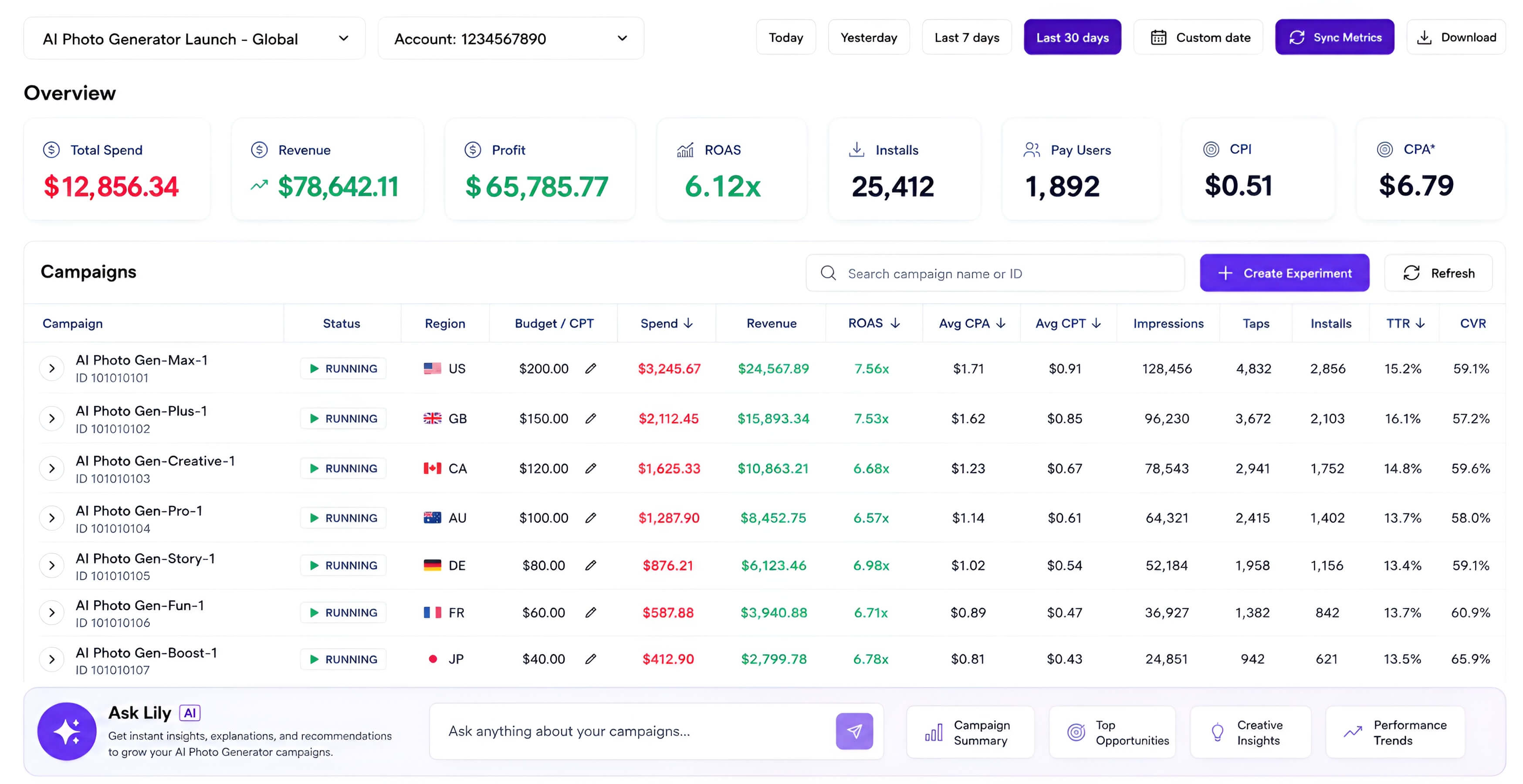
lily ads reports campaigns --app-id 999999999

{
  "appleAds": { "spend": "$12,856" },
  "revenue": { "source": "Lily Ads Revenue Analytics" },
  "roas": "6.12x"
}
Lily versus asc
A questão não é substituir asc. O objetivo é possuir o fluxo de trabalho Apple Ads onde a receita, o criativo, os lances e a migração do Platform API se encontram.
Ampla automação App Store Connect em lançamentos, TestFlight, metadados, assinatura, análises e Apple Ads.
Somente Apple Ads, com planejamento de campanha mais profundo, enriquecimento de receita, roteamento de criativos e lógica de migração.
Árvore de comando rica em endpoints para muitos trabalhos App Store Connect.
Comandos empresariais que criam uma campanha, grupo de anúncios, palavras-chave, negativos, meta CPA e criativo em um único plano.
Ótima superfície de automação de uso geral para agentes de codificação.
JSON dry-runs por padrão, confirmação explícita para gravações e prompts que mapeiam para decisões de crescimento.
Gerencia objetos e relatórios Apple Ads.
Conecta os gastos do Apple Ads ao Lily Ads Revenue Analytics para que os agentes possam explicar usuários pagos, lucro e ROAS.
Útil para acesso atual à API Apple Ads dentro de um kit de ferramentas maior.
Oferece suporte à Apple Ads Platform API 1.0 hoje e mantém a v5 para a migração. O Lily 0.2.2 oferece comandos de oportunidades alinhados ao contrato do SDK oficial.
Lily CLI is an independent Apple Ads-focused CLI and analytics tool for Apple Ads. It is not affiliated with Apple Inc. “Apple” and “Apple Ads” are trademarks of Apple Inc.
Platform API 1.0 — suporte disponível
Relatórios autenticados e consultas de oportunidades alinhadas ao SDK estão disponíveis pelo endpoint v1 da Apple. Use hoje o platform provider; a v5 continuará disponível durante a migração antes de sua desativação em 26 de janeiro de 2027.
Veja o que a Platform API 1.0 oferece aos anuncianteslily ads platform readinesslily --provider platform ads reports campaigns --app-id 999999999lily --provider platform ads suggestions keywords --app-id 999999999 --countries USlily --provider platform ads suggestions phrases --app-id 999999999lily --provider platform ads insights search-term-popularity --country US --genre Travelbrew install crevas/tap/lilyads
# or
curl -fsSL https://www.chatlily.ai/apple-ads-cli/install | bashPerguntas frequentes
A versão resumida: as chaves locais permanecem locais, o CLI permanece aberto e a análise de receita é a camada comercial.
Camada de receita principal CLI e Lily gratuita quando você precisar do ROAS